M365 Show Podcast
M365 Show Podcast
Podcast Description
Welcome to the M365 Show — your essential podcast for everything Microsoft 365, Azure, and beyond. Join us as we explore the latest developments across Power BI, Power Platform, Microsoft Teams, Viva, Fabric, Purview, Security, and the entire Microsoft ecosystem. Each episode delivers expert insights, real-world use cases, best practices, and interviews with industry leaders to help you stay ahead in the fast-moving world of cloud, collaboration, and data innovation. Whether you're an IT professional, business leader, developer, or data enthusiast, the M365 Show brings the knowledge, trends, and strategies you need to thrive in the modern digital workplace. Tune in, level up, and make the most of everything Microsoft has to offer. m365.showBecome a supporter of this podcast: https://www.spreaker.com/podcast/m365-show-podcast--6704921/support.
Podcast Insights
Content Themes
The show covers a broad range of topics related to Microsoft technologies, including automation techniques in SharePoint, the integration of Dynamics 365 with Teams, advanced data management within Microsoft Fabric, and productivity enhancements through tools like Power BI and Viva Connections, with specific episodes showcasing practical examples like building site scripts, setting up custom dashboards, and optimizing platforms for specific use cases.

M365.FM is a podcast about Microsoft 365, Microsoft Copilot, AI, Modern Work, security, governance, Power Platform, Azure, and the technologies shaping the future of work.Hosted by Microsoft MVP Mirko Peters, M365.FM brings together Microsoft MVPs, Microsoft employees, product experts, architects, developers, and community leaders from around the world.Each episode goes beyond announcements and hype to explore what Microsoft technologies mean in practice. From Microsoft 365 Copilot and AI agents to Teams, SharePoint, Power Platform, Microsoft Fabric, Entra, Purview, security, governance, adoption, and automation, M365.FM focuses on real-world experience, implementation, strategy, and lessons learned.Expect expert interviews, technical deep dives, practical explainers, and conversations with people building, implementing, and shaping the Microsoft ecosystem.If you work with Microsoft 365, Copilot, AI, Modern Work, or the Microsoft Cloud, M365.FM helps you understand what matters, what works, and what is coming next.Hosted by Mirko Peters, Microsoft MVP.
Become a supporter of this podcast: https://www.spreaker.com/podcast/m365-fm-a-microsoft-mvp-podcast-by-mirko-peters–6704921/support.
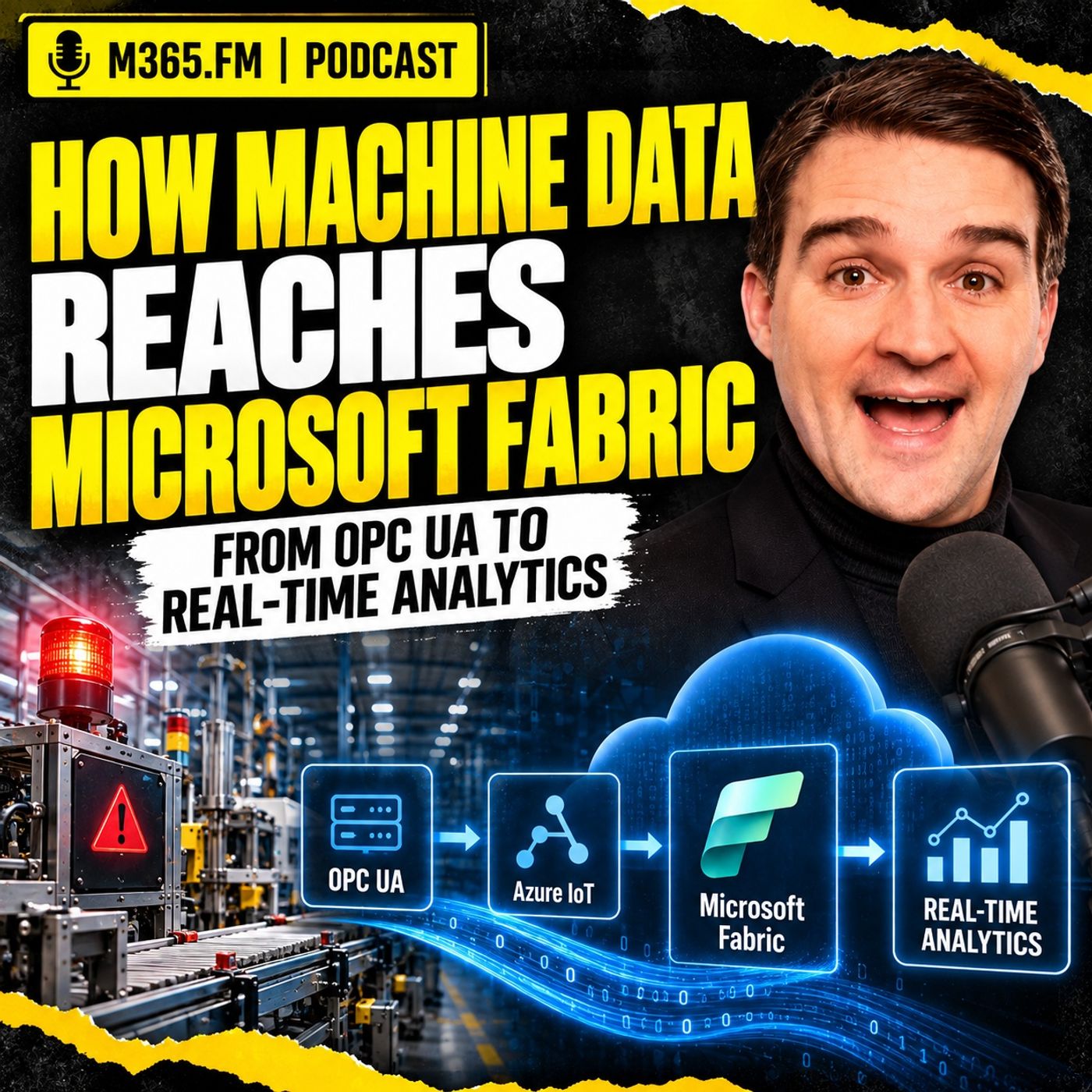
Getting machine alarms, sensor values, production counters, and fault events into the cloud is easier than ever. OPC UA exposes the machine signal, an edge layer collects it, MQTT can distribute it locally, and Microsoft Fabric can ingest and analyze the resulting stream. The difficult part starts after the data arrives: how do you turn raw telemetry into enough production context to support an actual decision?
This episode follows one machine signal from the factory floor through the Microsoft industrial data stack. It starts with OPC UA, moves through the edge and MQTT, crosses securely into Azure and Microsoft Fabric, and then looks at how Eventstream, Eventhouse, KQL, Lakehouse, Power BI, MES, ERP, maintenance data, and production context fit together. The goal is not simply to show another telemetry pipeline. It is to explain what has to happen before machine data becomes useful for production, maintenance, quality, and planning.
FROM MACHINE STOPPAGE TO PRODUCTION CONSEQUENCE
A machine stoppage looks simple at the controller level. The state changes from running to faulted, a fault code appears, the part counter stops, and perhaps other values change around the same time. That information is useful, but production usually asks a different question: which work order is affected, how much quantity remains, can another machine take over, and does this delay threaten a delivery?
The machine understands its own condition, but it does not automatically understand the business consequence. MES may know the operation and work order. ERP may know the due date and demand. Maintenance may understand the equipment history. Quality may determine whether output can still be used. That is why a fast telemetry pipeline is only the beginning of the architecture.
OPC UA — WHERE THE SIGNAL ENTERS THE DATA PATH
OPC UA provides a standardized industrial interface for accessing information from equipment without requiring every cloud application to understand proprietary controller protocols. A server can expose variables, machine states, alarms, events, methods, timestamps, quality information, and sometimes structured equipment models.
That structure matters because a useful industrial event should carry more than a numeric value. Source timestamps, server timestamps, quality status, units, source identity, and the original OPC UA node information can all become important later when somebody asks where a number came from or why a production calculation looks wrong.
The episode also emphasizes that a tag name is not a data model. A field called “temperature” or “machine state” still needs context such as the asset, engineering unit, allowed range, state definition, and the production situation in which the signal was observed.
KEEP THE OT BOUNDARY CONTROLLED
Machine connectivity should not turn the production network into an extension of the corporate or cloud environment. Industrial networks need controlled boundaries, typically including segmentation and an industrial DMZ, so that approved edge systems can communicate with equipment without giving enterprise applications direct access to controllers.
The recommended pattern is generally outbound-oriented. The edge layer connects to approved OPC UA endpoints and then sends selected information toward cloud services through controlled destinations, ports, protocols, and identities. Analytics platforms should receive data without inheriting broad rights to browse or modify production systems.
Certificates, firewall rules, trust relationships, expiry handling, and ownership also need to be treated as operational processes rather than one-time configuration work.
THE EDGE SHOULD IMPROVE DATA — NOT INVENT BUSINESS MEANING
The edge layer sits between the machine environment and the wider data platform. Its first responsibility is connection, but it can also filter, normalize, buffer, enrich, and route the information before it leaves the plant.
Useful edge responsibilities include:
• Selecting only signals required for defined use cases
• Filtering unnecessary high-frequency data
• Applying agreed unit conversions
• Preserving source timestamps and quality indicators
• Adding stable site, line, and asset identifiers
• Buffering during cloud outages
• Handling retry and back-pressure behavior
• Exposing connector and queue health
• Performing selected local calculations or AI inference where latency or disconnected operation requires it
The important boundary is that the edge should add facts it knows with confidence. It should not guess which production order is active based on stale information or quietly create business context that belongs to MES, ERP, planning, or quality systems.
AZURE IOT EDGE VS AZURE IOT OPERATIONS
The episode compares two Microsoft approaches for running industrial edge workloads.
Azure IoT Edge works well when the requirement is focused around a gateway or individual device. Containerized modules can collect data, apply local logic, buffer information, and send it upstream through Azure IoT Hub. This can be a practical choice for a defined cell or smaller workload where the organization wants a lighter operating footprint.
Azure IoT Operations is positioned more as a site-level industrial data environment. It runs on an Azure Arc-enabled Kubernetes environment and includes capabilities around OPC UA connectivity, MQTT, data flows, and asset or device management. That can make more sense when a site has several lines, multiple machine vendors, local consumers, and a need to repeat a governed edge pattern across plants.
The decision should not be based on which platform has the longest feature list. It should be based on the operating model the organization is prepared to support. Azure IoT Operations provides broader site-level capabilities, but it also introduces Kubernetes, Arc, cluster operations, monitoring, storage, patching, and recovery responsibilities.
MQTT AS THE FACTORY EVENT BACKBONE
When several consumers need the same machine events, MQTT can dramatically simplify the architecture. The machine connector publishes once to a broker, and maintenance applications, local historians, cloud data flows, or other approved consumers subscribe independently.
That removes many point-to-point dependencies. A new application can subscribe to an approved topic without creating another direct link into the PLC or OPC UA server.
Topic design still matters. A hierarchy can represent site, area, line, cell, and asset, but the topic should not become the entire data model. Important facts such as event identity, source timestamp, asset ID, quality, contract version, and event type should remain in the message payload so the event stays understandable even when stored, replayed, or routed elsewhere.
THE UNIFIED NAMESPACE IS A CONTRACT — NOT JUST A TOPIC TREE
The Unified Namespace pattern can provide a shared operational contract across industrial systems. The useful part is not simply having one huge MQTT hierarchy. The value comes from agreeing how assets are identified, how events are shaped, who owns the data, how schemas change, and which systems are authoritative for different facts.
A good Unified Namespace can provide a stable way to identify assets and publish governed operational events while allowing source systems to keep ownership of their own records.
That contract should define things such as:
• Asset identity
• Event types
• Message shape
• Timestamp rules
• Quality information
• Ownership
• Security
• Versioning
• Change management
MQTT can transport the contract, but MQTT does not create the contract.
FROM OPC UA NOTIFICATION TO MQTT EVENT
Turning an OPC UA notification into an MQTT event is more than protocol translation. The connector needs to preserve evidence from the industrial source while transforming the message into a format that downstream systems can understand.
For a state event, that could include a stable asset ID, signal name, value, source time, source quality, event type, and the original OPC UA node reference. For an alarm, additional fields might include fault code, severity, and source text where appropriate.
Different event types should remain distinct. Machine state, fault events, production counts, quality rejects, and condition measurements are not all the same type of telemetry and should not be forced into a vague generic record if consumers need different behavior.
THE PACKAGING CELL EXAMPLE
The episode uses a packaging cell to show why context matters even when the source signals appear simple. Machine state, good count, reject count, speed, and fault information may look straightforward, but each needs interpretation.
A zero speed can mean failure, planned changeover, waiting for material, or another expected condition. A reject counter may not identify which product or inspection point caused the rejection. A machine speed value means very little without the product-specific expected speed. A fault code may help maintenance but still does not explain the impact on the current order.
The design therefore needs explicit states, source evidence, timestamps, and links to the production context that will be added later.
Become a supporter of this podcast: https://www.spreaker.com/podcast/m365-fm-a-microsoft-mvp-podcast-by-mirko-peters–6704921/support.
Disclaimer
This podcast’s information is provided for general reference and was obtained from publicly accessible sources. The Podcast Collaborative neither produces nor verifies the content, accuracy, or suitability of this podcast. Views and opinions belong solely to the podcast creators and guests.
For a complete disclaimer, please see our Full Disclaimer on the archive page. The Podcast Collaborative bears no responsibility for the podcast’s themes, language, or overall content. Listener discretion is advised. Read our Terms of Use and Privacy Policy for more details.